
|
ZGameEditor Documentation
Community |
Howto /
Generate files for Linux and OS XGenerate files for Linux and OS X(:selectlang:) 1. Start ZGameEditor 2. Open your project or one of the sample projects. 3. Choose to generate a binary for the target platform: 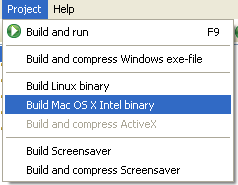 4. Copy the generated binary to the target platform. Platform requirements:
Also note that on Linux you must check 2 things: first of all, the file must be executable. You can set the file executable from a shell terminal with the command "chmod 755 your_file_name", or from a filemanager application. Plus, the engine looks for a lib called "libGL.so". You might have some other libs like "libGL.so.1" or "libGL.so.1.2" installed in your "usr/lib" folder. If this is the case, you can create a system link using the command "ln -s usr/lib/libGL.so.1 usr/lib/libGL.so". Root privileges are needed. Current limitations:
Screens: WolfAndBart-application running on Ubuntu Linux 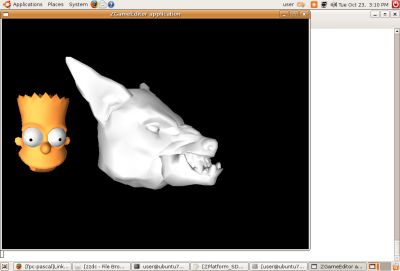 ShaderDemo-application running on Mac OS X 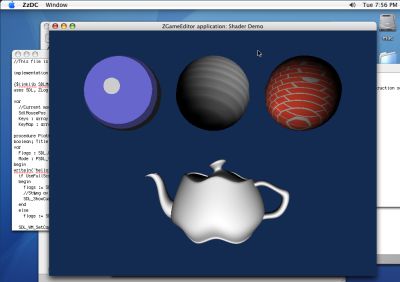 Questo "HowTo" descrive come far sì che i tuoi progetti creati con ZGameEditor funzionino anche sotto Linux e MacOs X. 1. Apri ZGameEditor 2. Apri il progetto. 3. Scegli di generare un file binario per la piattaforma specifica: 4. Copia il file generato sulla piattaforma specificata. Requisiti per la piattaforma target:
Inoltre sotto Linux devono essere controllati due requisiti: il primo è che il file sia eseguibile. Puoi settare questa opzione da un terminale attraverso il comando "chmod 755 your_file_name", o da un qualunque filemanager. Inoltre, il gioco richiede la presenza di una libreria (installata insieme alle OpenGL) chiamata "libGL.so". Può darsi che tu abbia installate altre librerie come ad esempio "libGL.so.1" o "libGL.so.1.2" presenti nella cartella "usr/lib". In questo caso, puoi creare un system link usando il comando "ln -s usr/lib/libGL.so.1 usr/lib/libGL.so". Per tale operazione sono necessari i privilegi di root. Limitazioni attuali:
Screenshots: WolfAndBart-application sotto Ubuntu Linux ShaderDemo-application in esecuzione su Mac OS X |